Authentication
MantleWP uses two authentication methods depending on context: session-based auth for the dashboard and API key auth for the WordPress plugin.
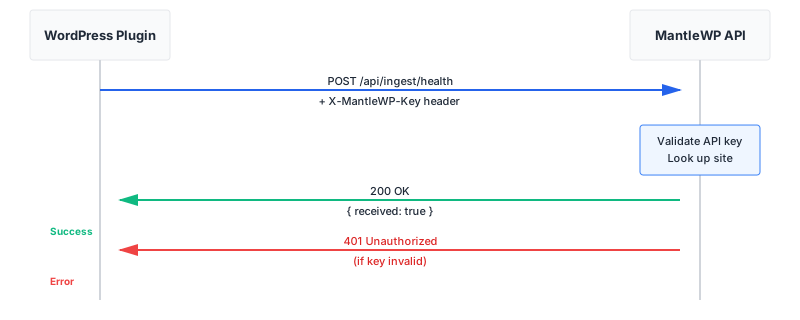
Session Authentication (Dashboard)
Used by the web dashboard. MantleWP implements NextAuth.js v5 with email magic links. When you log in, a secure session cookie is created automatically. This cookie is sent with every request to the API, so no manual token management is needed.
For API calls from the dashboard, the session cookie authenticates the request. You don't need to add headers or tokens — the browser handles it.
API Key Authentication (WordPress Plugin)
Used by the MantleWP connector plugin on your WordPress sites. Each site you add to MantleWP gets a unique 64-character API key generated immediately. This key is displayed once when the site is created.
Send the API key via the X-MantleWP-Key HTTP header on every request:
POST /api/ingest/health
X-MantleWP-Key: your-64-character-api-key-here
Content-Type: application/json

{
  "php_version": "8.2.1",
  "wp_version": "6.4.3",
  ...
}
API Key Security Best Practices
Treat API keys like passwords. Follow these practices:
- Copy immediately. Keys are displayed once when a site is created. Save it right away.
- Store securely. The WordPress plugin stores the key in
wp_optionswith proper WordPress security practices. - Rotate on compromise. If a key is exposed, delete the site and re-add it to generate a new key.
- No URLs or query strings. Never pass API keys in URLs or query parameters — always use request headers.
- No client-side code. Never embed keys in JavaScript, browser storage, or any client-side code.
- Single site per key. Each key is scoped to exactly one site. One compromise doesn't expose other sites.
Error Responses
When authentication fails, the API returns specific error codes:
| Status | Meaning |
|---|---|
| 401 | Unauthorized — Missing, invalid, or expired API key or session |
| 403 | Forbidden — Valid authentication but insufficient permissions (e.g., team member trying to delete an organization) |
Example 401 response:
{
  "error": {
    "message": "Invalid API key",
    "code": "INVALID_API_KEY"
  }
}
Next steps: Back to API Reference, set up the WordPress plugin, or manage your sites.