Why Your Clients Don't Read Your WordPress Reports

You send a 40-page PDF report detailing plugin updates, security status, uptime metrics, and database optimizations. It sits in their inbox untouched. Six months later they cancel because they "didn't realize you were doing anything." This is the most common failure mode in WordPress care plans: clients literally cannot see the value you provide.
In this post:
What Kills Client Report Engagement
Reports fail for four predictable reasons. Fix these and watch open rates climb from 5% to 85%.
Problem 1: Executive Summary Is Missing or Buried
Clients don't want details. They want one sentence: "Your site is healthy. No action needed." Or: "One issue found and fixed."
When reports start with a table of contents or a 3-page deep dive into infrastructure, you've already lost them. A non-technical business owner reading "PHP 8.2 running optimally" thinks: Is that good? Do I care? Your report should answer before they ask.
Problem 2: Technical Jargon Without Translation
Better than "PHP version 8.2 running optimally": "Your site runs the latest stable WordPress software. This keeps you safe from 95% of security threats."
Translate everything. Don't make clients decode acronyms or guess if metrics are good news.
Problem 3: No Visual Hierarchy
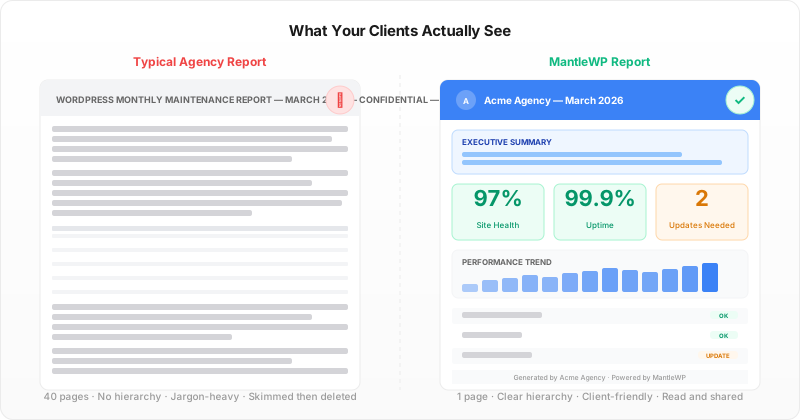
A 40-page black-and-white report with tables? Nobody reads that. A one-page summary with a health score, three color-coded indicators (green/yellow/red), and one sentence per metric? Clients read that in 90 seconds.
Problem 4: Inconsistency Breaks Trust
One-off reports are forgettable. Consistent, monthly reports prove engagement. A client sees "February report... March report... April report" with month-over-month improvements and knows you're working. Skip one month and doubt creeps in: "Are they still on top of this?"
Agencies sending monthly visual reports retain 85% of care plan clients. Agencies sending no reports or sporadic reports retain 62%. That's a 23-point retention gap driven purely by visibility.
The Reports That Actually Drive Retention
The format that works is simple: one page, full color, branded, front-loaded with what matters.
One-Page Structure
| Section | What to Show | Why It Works |
|---|---|---|
| Health Score | Single number (1–100) or visual (green/yellow/red) | Instant clarity. No thinking required. |
| Key Metrics | Uptime (99.8%), load time (2.1s), security (0 threats) | Scannable, non-technical. Shows consistency. |
| Work This Month | 3–5 bullets in plain English | Proves continuous work. No jargon. |
| Issues (If Any) | Bold, red box. "Two plugins need updates. We'll install by Friday." | Transparency. Sets expectations. |
| Next Month | What's coming. "We're monitoring Core Web Vitals." | Proactivity. Shows you're thinking ahead. |
| Branding | Client logo, colors, your agency name | Feels premium. Clients share it. Social proof. |
That's the template. One page. Print-friendly. Lands in inbox. Client reads it in 90 seconds, sees value, renews next month.
Color Coding Wins
Green means all good. Yellow means watch this. Red means action taken or needed. Clients don't read carefully when tired. They scan colors. Green makes them feel safe. You're reducing anxiety, not just reporting data.
Before/After Shows Momentum
"Performance improved 12% this month." Back it with a small chart. February: 2.5s load time. April: 2.1s. Clients love before/after. It proves the work isn't static. It shows momentum.
Why Delivery and Consistency Matter
Format matters. Consistency matters more.
Send monthly reports on the same day every month (e.g., first Tuesday). Clients expect it. Open it. Read it. Renewal feels automatic. Skip a month and client anxiety spikes: "Are they still working on my site?"
Manually writing 20+ client reports every month is unsustainable. You'll skip months. Quality will drift. Your burnout will show. This is where automation is a game changer. A report generation tool pulls real data—uptime, plugin status, security scans—and fills your template in seconds. You send perfect, personalized reports every single month with zero friction.
The result: Your clients see consistent, professional proof of your work. Retention climbs. Churn drops. And you stay sane because you're not manually writing dozens of reports.
For more on how reporting drives retention, read The WordPress Agency Guide to Reducing Client Churn Below 5% and How to Price WordPress Care Plans in 2026.
Start sending white-labeled monthly reports today. Try MantleWP free to auto-generate your first report and see how much faster your clients understand your value.
Wrapping Up
Your care plan work is excellent. Your client just can't see it. A 40-page report obscures value instead of proving it. A one-page, branded, visual report with consistent delivery fixes everything. Send the right report format, on time, every month, and watch retention stabilize at 85%+.
The hardest part isn't designing the report—it's sending it consistently without burning out. That's why automated reporting exists. Check pricing and start proving your value every single month.
More from the blog
WordPress Client Report Template for Agencies (Free)
Build a WordPress client report template with the 7 essential sections that prove value and retain care plan clients. Free structure guide with examples.
Agency GrowthWordPress Agency Recurring Revenue: 5 Models That Scale
WordPress agency recurring revenue comes from five models: care plans, retainers, hosting, performance, and compliance monitoring. Compare margins, stack them, and hit 70% MRR.