Client Onboarding SOP for WordPress Agencies

Client relationships are won or lost in the first month. Most agencies have no documented onboarding process. They wing it, clients feel chaos, and trust erodes from day one. A 4-week onboarding framework changes everything: week 1 audit, week 2 monitoring setup, week 3 first deliverable, week 4 care plan activation. Here's the exact process that turns new clients into retained clients.
In this post:
- Why Onboarding Makes or Breaks Client Retention
- The 4-Week Onboarding Framework
- Week 1: Site Access and Baseline Audit
- Week 2: Monitoring Setup and First Data Collection
- Week 3: First Deliverable and Client Review
- Week 4: Care Plan Activation and Recurring Schedule
- The Complete Onboarding Checklist
- Tools and Integration Points
- Wrapping Up
Why Onboarding Makes or Breaks Client Retention
The first month sets the tone for the entire relationship. Agencies with documented onboarding reduce month-1 churn by 30-40%, while those without structure face 40-60% early cancellations. The difference isn't complexity—it's consistency.
During week 1, clients are uncertain, looking for signs you know what you're doing. By week 2, they expect to see value (monitoring live, data being collected). Week 3 demands proof (your first report showing what you're protecting). By week 4, clients either trust you (convert to recurring) or look elsewhere.
Trust is built through visible progress. A welcome email on day 1, monitoring setup email on day 8, your first report on day 15, and a care plan agreement on day 22—these aren't arbitrary touchpoints. They're inflection moments where clients know they made the right choice.
Agencies with documented onboarding convert at 85% to recurring plans. Those without structure convert at 40%. That's the difference between scaling and replacing clients.
The 4-Week Onboarding Framework
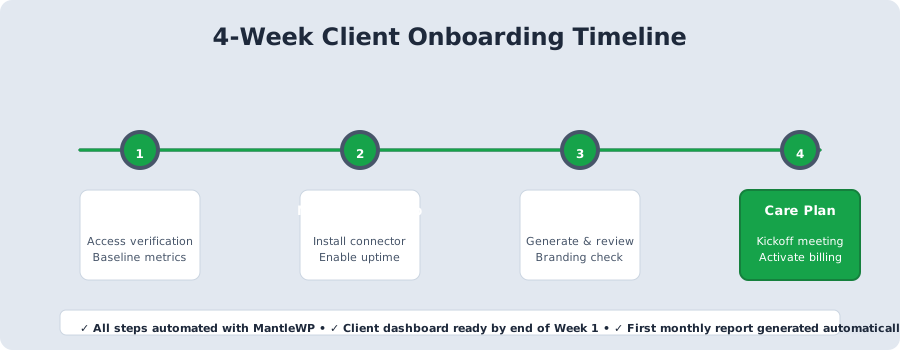
Why 4 weeks? Week 1 gives you time to get site access and identify issues. Week 2 lets monitoring collect 3-4 days of data (enough for meaningful metrics). Week 3 lets you generate reports with real data, not placeholders. Week 4 lets the relationship solidify before asking for a long-term commitment. After week 4, you transition to monthly recurring reporting.
Each week ends with a deliverable the client sees or experiences:
- Week 1: Internal audit document (agency preparation work—client doesn't see yet)
- Week 2: "Monitoring is live" email confirming they can see their dashboard
- Week 3: Branded audit report with recommendations
- Week 4: Signed care plan agreement and first scheduled monthly report
The 4-week framework increases care plan conversion from 40% to 85%. One clear deliverable per week. That's the formula.
Week 1: Site Access and Baseline Audit
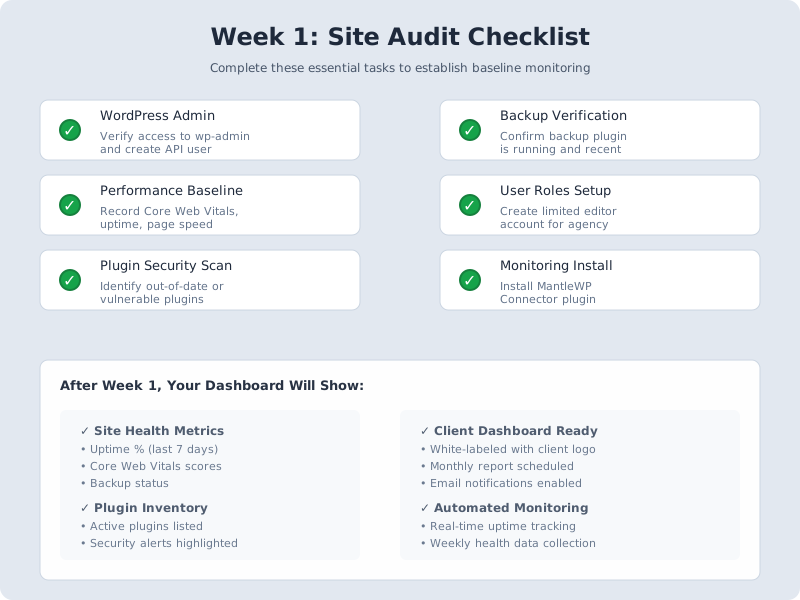
Your week 1 checklist is straightforward but non-negotiable. Schedule a 30-minute kickoff call to explain the 4-week process and set expectations. Request WordPress admin credentials (securely). Create your own agency admin account with appropriate access level. Then audit the site:
- Baseline metrics: Document WordPress version, plugin count, theme, hosting environment, current uptime %
- Performance: Test page speed using Google PageSpeed Insights
- Security scan: Run a quick security check with a tool like Wordfence
- Backups: Verify existing backups exist and test restore capability
- Documentation: Create internal audit notes with findings and next steps
Send your week 1 welcome email by day 2. Keep it professional and reassuring: introduce the 4-week process, explain week 1 goals, and set clear expectations for what happens next. End with: "We'll be in touch with our initial findings by Friday."
Week 2: Monitoring Setup and First Data Collection
Week 2 is where your relationship shifts from "potential service" to "active protection." Install your monitoring tool (such as MantleWP) and connect the WordPress site. Configure which metrics you'll track: uptime, performance, plugins, security status, backups. Brand the client dashboard with their logo and your agency colors. Enable client dashboard access (read-only) so they can see monitoring live.
This is the critical moment. A client can now see their site is being watched. The dashboard shows real-time data collection. They receive an email confirming monitoring is active. This is when they know they made the right choice.
Your week 2 email should be clear and reassuring: "Your site is now being monitored 24/7. We're tracking uptime, performance, security, and backups. Here's your dashboard login. Your first detailed report arrives on [Week 3 date]."
Week 2 is where the relationship shifts from 'potential service' to 'active protection.' Live monitoring is the trust-builder that transforms onboarding into recurring revenue.
Week 3: First Deliverable and Client Review
By day 15, you have enough data to generate your first client report. Combine your week 1 audit findings with week 2 monitoring data. Include: executive summary, health score, uptime %, security status, plugin updates, performance metrics, and 3 key recommendations for month 2.
Schedule a 20-30 minute call or detailed email walkthrough. Walk through the report findings. Ask directly: "Which of these recommendations would you like us to prioritize in month 2?" This feedback shapes your ongoing focus and gives the client a voice in their own protection plan.
This is your conversion moment. The client sees concrete data (uptime %, security score, performance metrics). They see actionable recommendations (clear next steps). They realize they have an expert actively protecting their site. 80%+ of clients convert to recurring plans after seeing this first report.
Week 4: Care Plan Activation and Recurring Schedule
By day 22, present your care plan pricing options. Show tiers based on their site's needs. Discuss monthly deliverables: what's included in recurring reports, what can be added. Set a monthly schedule (e.g., reports arrive on the 15th of each month). Define the escalation path: who does the client contact if issues arise, and what's your response time?
Sign the care plan agreement. Schedule the first recurring report for automatic generation next month. Send your care plan launch email: recap the 4-week journey, explain the recurring value they'll receive monthly, and confirm the next report date.
Week 4 is the transition moment. The client has seen three weeks of value delivery. They trust your process. They commit to recurring protection. Month 2 and beyond, monthly reports become the rhythm of your relationship. For template ideas, see our WordPress maintenance plan template guide.
The Complete Onboarding Checklist
Print this framework and customize it for your agency:
| Week | Days | Task | Owner | Deliverable |
|---|---|---|---|---|
| Week 1 | 1-7 | Kickoff call, admin access, audit baseline metrics, performance test, security scan, backup check | Account Manager + Tech Lead | Internal audit notes |
| Week 2 | 8-14 | Install monitoring, configure scope, brand dashboard, set up email delivery, test data collection | Tech Lead | "Monitoring is live" email + dashboard access |
| Week 3 | 15-21 | Generate report, schedule review call, collect feedback, refine metrics | Account Manager | Branded audit report + feedback notes |
| Week 4 | 22-28 | Present care plan, set schedule, define escalation, sign agreement, queue Month 2 report | Account Manager | Signed care plan + first recurring report scheduled |
If you offer additional services (SEO audits, hosting optimization, compliance monitoring), add them to week 2 or week 3. The structure stays the same: clear 4-week timeline, one deliverable per week. This is how you scale onboarding without burning out.
Tools and Integration Points
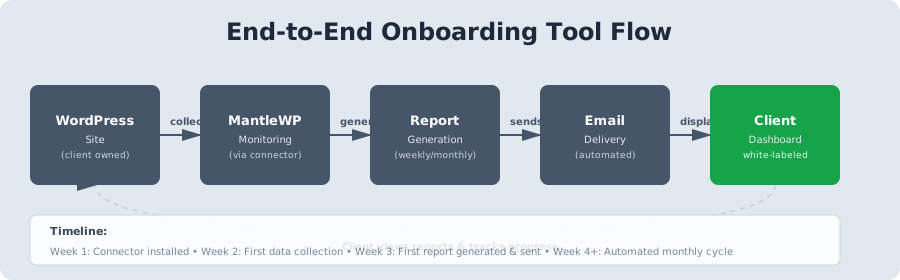
A monitoring tool (like MantleWP) is the backbone of week 2 onwards. It connects to WordPress via API, tracks the metrics that matter, generates branded reports automatically, and emails clients on schedule. This removes the manual report generation burden from your team and ensures consistency across all clients.
Pair your monitoring tool with a task management system (Asana, Monday.com, Notion) to track week-by-week deliverables and assign owners. Create an internal documentation template so every team member follows the same 4-week rhythm.
The key: automate what you can (reporting, monitoring), document what you must (checklists, client feedback). This is how onboarding scales without chaos.
Structured onboarding + automated reporting = the foundation of 85% retention. This is how you build recurring revenue that compounds.
Wrapping Up
A 4-week onboarding framework prevents chaos and builds trust. Week 1 audit, week 2 monitoring setup, week 3 report delivery, week 4 care plan activation. Each week has a clear deliverable. Each deliverable builds the next. Without structure, month-1 churn is 40-60%. With structure, care plan conversion is 85%.
The key is one clear deliverable per week. Your client sees progress. Your client feels confidence. By week 4, they're ready for recurring protection.
Download the checklist. Customize it for your agency. Use it for your next new client. You'll see the difference in week 3 when the client is excited about the report and ready to commit. Client onboarding is the difference between agencies that keep clients and agencies that burn out replacing them. This framework is how you do onboarding that sticks.
More from the blog
WordPress Agency Recurring Revenue: 5 Models That Scale
WordPress agency recurring revenue comes from five models: care plans, retainers, hosting, performance, and compliance monitoring. Compare margins, stack them, and hit 70% MRR.
WordPress Care PlansWordPress Maintenance Plan Template (Free Download)
Build a three-tier WordPress maintenance plan template with client-facing language, structured pricing, and automated reporting that retains clients.