Best Cookie Consent Plugins for WordPress Agencies (2026 Comparison)

A misconfigured consent plugin doesn't just break Google Ads tracking—it exposes your clients to GDPR fines and gives regulators a reason to audit their entire operation. Yet most WordPress agencies ship consent plugins without verifying they're actually working. Cookie banners look right to the eye but fail in ways that only auditors—and regulators—catch.
This comparison cuts through the noise. We reviewed five plugins used by agencies daily, tested their Google Consent Mode v2 compliance, and built a decision framework so you pick the right one for your operation. One of them is free and open-source. Another has built-in verification so you know clients are compliant every month.
Quick Navigation
Why Agencies Need Consent Plugins
Three regulatory pressures hit WordPress agencies at once:
GDPR and regional consent laws. The EU, UK, CCPA states, and Brazil all require explicit consent before storing cookies or tracking pixels. A site without a consent banner doesn't just violate privacy law—it invalidates every Google Analytics hit and ad conversion claim. Your clients can't legally run Google Ads without knowing their consent plugin is working.
Google Ads compliance. Google's Google Consent Mode v2 requires consent signals tied to specific cookie categories. If your client's consent plugin doesn't send the right signals, Google Ads pauses or reduces tracking. The advertiser blames you. The agency loses the account.
Audit and insurance liability. Agencies sell "care plans" promising security and compliance. If a client gets a GDPR complaint and the audit reveals your consent plugin is misconfigured, that's on you. Many E&O insurance policies exclude consent-related claims, leaving you exposed.
The solution: deploy a consent plugin that handles Google Consent Mode v2 correctly and verify it monthly. That's the only way to sleep at night and keep clients from discovering the problem in a regulator's letter.
The Five Best Plugins
We tested plugins on four criteria: ease of setup, customization depth, GDPR compliance strictness, and Google Consent Mode v2 accuracy. Here's what leads the market in 2026.
CookieBot (Cookiebot by Usercentrics)
Best for: Agencies managing 50+ sites needing enterprise support and automatic cookie discovery.
CookieBot automatically scans your site, identifies third-party scripts, and maps them to consent categories. Saves hours of manual audit work. Offers custom consent flows, advanced reporting, and EU data residency. The barrier: pricing ($30–100/mo per site for agencies) adds up fast at scale, and setup requires more technical hand-holding than smaller agencies have time for.
Complianz
Best for: Solo and small agencies who want plug-and-play GDPR + cookie setup with light customization.
Complianz walks you through GDPR compliance in a wizard, auto-generates privacy policy text, and integrates with Stripe and WooCommerce. Good Google Consent Mode v2 support. The gap: limited white-label options, so clients see "Complianz" branding on the banner unless you pay for white-label tier ($29/mo).
MaxtDesign Cookie Consent
Best for: Agencies prioritizing full control, zero vendor lock-in, and deep integration with their own reporting tools.
MaxtDesign is free, open-source, and available on WordPress.org. Full Google Consent Mode v2 support out of the box, complete banner customization, and a config system that integrates with MantleWP for automated monthly compliance verification. No SaaS fees, no per-site pricing, no vendor lock-in. Trade-off: you're responsible for updates and feature requests, though active development is ongoing.
iubenda
Best for: Agencies across multiple jurisdictions (GDPR, CCPA, Brazil, Australia) needing automated legal compliance.
iubenda auto-generates legal documents tailored to each jurisdiction, maintains consent records for audit, and handles cookie classification at scale. Expensive ($24–240/mo) and creates dependency on iubenda for legal documentation, so client lock-in is real. Google Consent Mode v2 support is solid but requires setup on their platform.
Termly
Best for: Agencies wanting one platform for consent, privacy policy, terms, and cookie audits.
Termly bundles cookie consent, auto-generated legal docs, consent records, and native integrations with Stripe, Shopify, and Google. Monthly pricing ($20–200) scales per site. Google Consent Mode v2 works well. Risk: dependency on Termly's legal accuracy and uptime; if their service goes down or they change terms, you're stuck.
Detailed Comparison
Here's how these five stack up on the factors that move agency decisions:
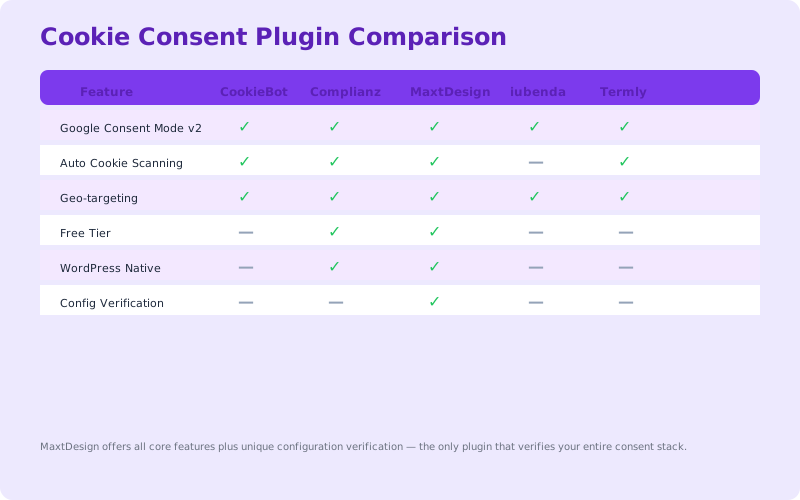
| Plugin | Setup Difficulty | Customization | GDPR Compliance | Google Consent Mode v2 | Cost (per site/mo) |
|---|---|---|---|---|---|
| CookieBot | Medium | High | Strict | Native, Excellent | $30–100 |
| Complianz | Low | Medium | Strict | Native, Good | $10–29 |
| MaxtDesign | Low | High | Strict | Native, Excellent | Free |
| iubenda | Medium | Medium | Strictest | Native, Good | $24–240 |
| Termly | Low | Medium | Strict | Native, Good | $20–200 |
All five plugins support Google Consent Mode v2 natively. The difference lies in setup friction and integration depth. CookieBot and iubenda demand more expertise but give the most control. MaxtDesign trades SaaS overhead for self-hosting responsibility. Complianz and Termly sit in the middle.
MaxtDesign Deep Dive
MaxtDesign Cookie Consent deserves expanded attention because it's free and because it's the only plugin with built-in integration for automated compliance verification—something agencies haven't had before.
Why MaxtDesign Matters for Agencies
Zero licensing fees. Flat cost: WordPress.org hosting. You own the plugin code. No monthly SaaS invoice, no vendor lock-in, no per-site pricing. Deploy it to 100 client sites for the same cost as two months of CookieBot on one site.
Google Consent Mode v2 built in. The plugin ships with consent signal mapping for Google Analytics 4, Google Ads, and Firebase. No third-party middleware. No data passes through another company's servers. Direct signals from consent choice to Google's servers.
Full customization. Banner color, text, placement, category labels, cookie policy links—all customizable per site without leaving WordPress. Client branding is native, not an upsell feature.
Automated verification with MantleWP. This is the novel part. MantleWP reads MaxtDesign's configuration directly, verifies that consent categories are mapped correctly, checks that Google Consent Mode v2 signals are being sent, and generates a monthly compliance report. You get proof that the setup is working. Clients see it on their dashboard. Auditors and regulators see a documented trail.
Key insight: No other consent plugin offers automated compliance verification as a built-in feature. CookieBot requires manual audits. Complianz and iubenda have no integration with site health tools. MaxtDesign + MantleWP close the loop: deploy, verify, report, repeat.
When to Use MaxtDesign
Use MaxtDesign if: You manage 10+ sites and want to standardize on one plugin; you need white-label customization without per-site licensing; you're integrating consent data into your own client reporting; you want predictable costs that scale to zero per new site.
Don't use MaxtDesign if: Your agency requires premium support and the vendor's SLA guarantee; you need automatic cookie scanning (MaxtDesign requires manual consent category mapping); you prefer outsourcing compliance to a vendor rather than owning the verification.
How to Verify Consent Setup
Installing a consent plugin doesn't mean it's working. Three verification steps catch the gaps that regulators find.
1. Browser Tools: Google Tag Manager Preview
Enable GTM preview mode on your client's site. Trigger the consent banner, select categories, and check the GTM console. You should see events like gtm.js and consent state updates. If consent categories aren't reflected in the GTM data layer, the banner is cosmetic.
2. Google Ads & Analytics Consent Demo
Google provides a consent demo page that shows how consent signals affect tracking. Test your client's site there. If analytics and ads consent signals don't respond to banner choices, your plugin isn't wired correctly to Google's APIs.
3. Monthly Automated Verification (MantleWP)
MantleWP Pro and above automatically audits consent setup monthly, checks Google Consent Mode v2 signals, and flags misconfiguration before auditors or clients notice. The report goes to your dashboard and can be sent directly to the client as proof of compliance. This removes the manual audit burden and gives you a documented trail.
Common mistakes we see: Banner displays but doesn't actually block cookies; Google Consent Mode signals aren't sent even though the banner works; consent categories are labeled but not mapped to actual site cookies; plugin updates break consent flow without anyone noticing for weeks.
For a comprehensive walkthrough, see our GDPR compliance checklist for agencies.
How to Choose
Use this framework to narrow down to the right plugin for your operation.
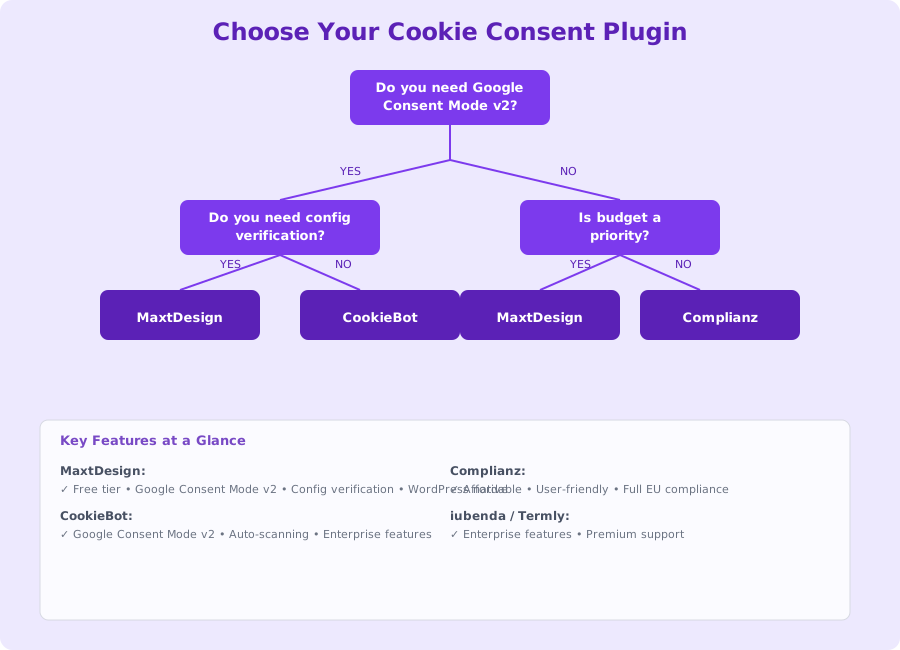
1. How many sites do you manage?
- 1–5 sites: Complianz. Setup wizard, low friction, built-in legal templates. You're small enough to tolerate the per-site fee.
- 6–20 sites: MaxtDesign. Free scales to your size. Setup is manual per site but one-time. Customization is deep. Integration with your own tools is straightforward.
- 20+ sites: CookieBot or MaxtDesign at scale. CookieBot if you need enterprise support and auto-scanning. MaxtDesign if you want predictable cost and control.
2. Do you need white-label customization?
- Yes, client branding is key: MaxtDesign (free) or CookieBot (paid). Both let clients see their brand on the banner.
- No, WordPress admin only: Complianz. Sufficient for sites where the client sees the banner but you manage the config.
3. Do you want to own compliance verification or outsource it?
- Own it (get automated reports): MaxtDesign + MantleWP. You generate monthly compliance proof.
- Outsource to vendor: iubenda or Termly. They maintain consent records and generate audit trails.
4. What's your budget per site per month?
- $0: MaxtDesign.
- $10–30: Complianz or Termly (starter tier).
- $30+: CookieBot, iubenda, or Termly (pro tier).
Once you've narrowed down using these four questions, pilot the plugin on a staging site. Test the banner UX, check that Google Consent Mode v2 signals appear in your analytics, and verify that it doesn't break on your client's other plugins. Then roll it out.
If you're using MaxtDesign, see how MantleWP's Pro tier integrates for automated monthly compliance verification. It removes the manual audit work and gives you a monthly proof point for every client.
Wrapping Up
Cookie consent plugins are table stakes for WordPress agencies. But not all of them work. A misconfigured banner is worse than no banner—it creates legal exposure and breaks Google Ads tracking without you knowing.
For most agencies, the choice is between MaxtDesign (free, full control) and Complianz (low-friction, built-in templates). MaxtDesign wins if you manage more than 5 sites or want white-label customization. Complianz wins if you want a wizard-driven setup and don't mind per-site fees.
The real game-changer is automated verification. MaxtDesign + MantleWP is the only combination that gives you monthly proof that consent is working. That proof is what auditors want to see. It's also what your clients want in their care plan reports. Deploy it, verify it monthly, and sleep knowing you're compliant.
More from the blog
WordPress Agency Recurring Revenue: 5 Models That Scale
WordPress agency recurring revenue comes from five models: care plans, retainers, hosting, performance, and compliance monitoring. Compare margins, stack them, and hit 70% MRR.
WordPress Care PlansWordPress Maintenance Plan Template (Free Download)
Build a three-tier WordPress maintenance plan template with client-facing language, structured pricing, and automated reporting that retains clients.